Reviews
2extract Review - Residential Proxies Your Agent Can Drive
We've tested 2extract, a developer-first residential and mobile proxy network with an MCP server that lets an AI agent create and manage proxies for you.
We've tested Adviserry, an AI business advisory tool that reads the newsletters and YouTube channels you already follow and drafts the specific moves worth making this week.
Welcome to this Adviserry review ✨
Every founder I know has the same guilty folder. Mine is an inbox full of newsletters I subscribed to on purpose and open maybe one time in ten, plus a YouTube subscription list I add to faster than I watch it. The people writing and filming this stuff are good, and some of them have already solved the exact problem I am stuck on this week. None of it reaches my product, because reading it is a separate job from building.
Adviserry attacks that gap from an unusual angle. It does not try to make you read faster. It reads for you, weighs what it finds against a description of what you are actually working on, and then drafts the specific moves worth making, each one traced back to the issue or video it came from. Its own framing on the home page is blunt about the target: "For founders who follow the best experts and act on none of it."
The founder asked me to test three things in particular: the user context that aims everything at your situation, the panels that group your sources by theme, and the MCP server that puts the whole archive inside Claude or ChatGPT. I connected my real Gmail, my real YouTube subscriptions, told it the truth about Uneed's Q3, and spent a couple of days pushing on all three. Here is what I found, including the parts that broke.
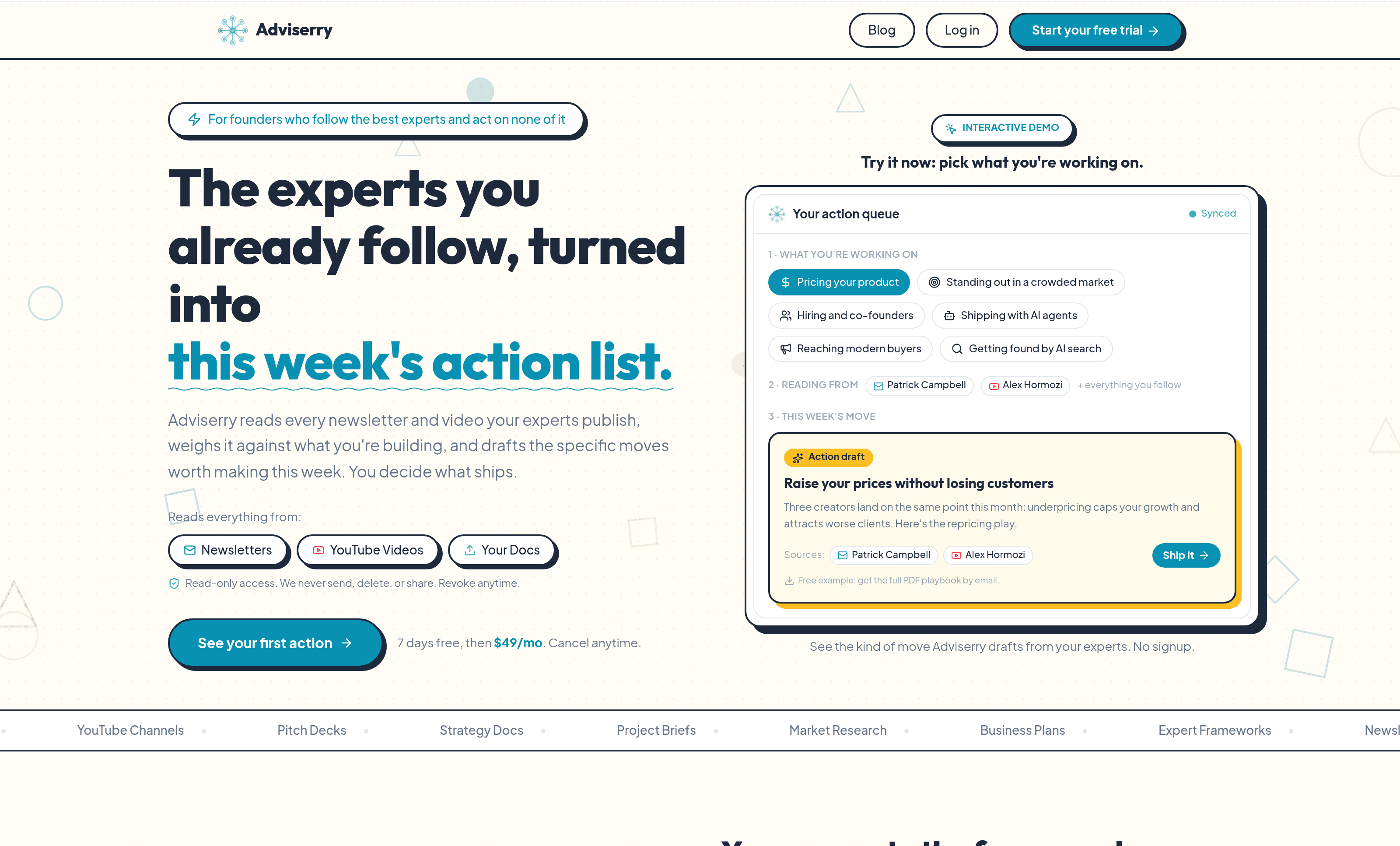
Signup drops you into a three-step setup: tell us about you, connect sources, generate your first actions. It is one of the better onboarding flows I have used this year, mostly because step two does real work instead of showing you an empty state.
You pick a few topics from a list (Growing my business, Marketing & growth, Product strategy, Personal finance, and so on), and those become the names of your panels. Then you connect Google. The scope is read-only and the copy says so plainly under the button: "Read-only access. We never send, delete, or share. Revoke anytime." What happens next is the good bit. Adviserry scans the last 90 days of your inbox and streams results in as it goes, counting messages checked against newsletters found. Mine finished with 72 candidates, sorted into three buckets: 11 it was confident about and pre-selected for me, 5 filed under "Worth a look", and 56 written off as "Marketing and notification senders". Each card carries little tags like "Mailing list" and "Long-form writing" plus an issue count, and a one-click "Not a newsletter" to correct it.
The classifier is good at shape and blind to relevance, which is worth knowing before you click. It correctly spotted every newsletter I actually subscribe to. It also confidently offered me a forum notification bot and a couple of campaign mailing lists that are newsletters in form and useless as advice. Selecting your sources is a decision you have to make yourself, and the same is even more true of YouTube: it pulled all 22 of my subscriptions, which is an honest list of what I watch and a terrible list of who advises me. Four of those channels were relevant. The rest make Pokémon card openings and cook street food.
There is a hard cap of 10 sources per panel and the interface enforces it in front of you. When I had 11 newsletters selected, an orange line appeared under the button: only 10 will fit, the rest will be skipped, and "Panels work best focused on one theme anyway, so spreading sources across panels is a feature, not a chore." I appreciated being told before I clicked rather than after.
One thing to be ready for: the first "Generate my actions" came back empty. The archive was still ingesting, and the screen told me so ("Nothing yet. Your actions will also appear on the Actions page once your sources finish processing"). A minute later it worked. If you run through setup at speed you will hit that, and it reads like failure when it is really just a queue.
This is the feature the founder wanted led with, and having used it, he is right to.
In step one Adviserry gives you a free text box and a genuinely good prompt: "What do you need to achieve or overcome to make this a great quarter? This is the single most useful thing you can give us." I wrote about four hundred words on Uneed: three revenue lines, the fact that sponsored reviews are the highest-margin product and only sell if the blog ranks, the moderation time the waiting line eats, the low free-to-paid conversion, and the constraint that I am one person and anything over a few hours a week does not ship.
That text is stored verbatim and shown back to you under "In their own words", alongside a structured advisor profile: role, current projects, challenges, goals. The Context page also keeps a list of individual "context items" you can tag to a specific panel, so one project's material does not leak into another project's advice. There is a settings toggle I did not expect and now like: a reminder to review your context every 14 days, on the theory that stale context quietly produces stale advice.
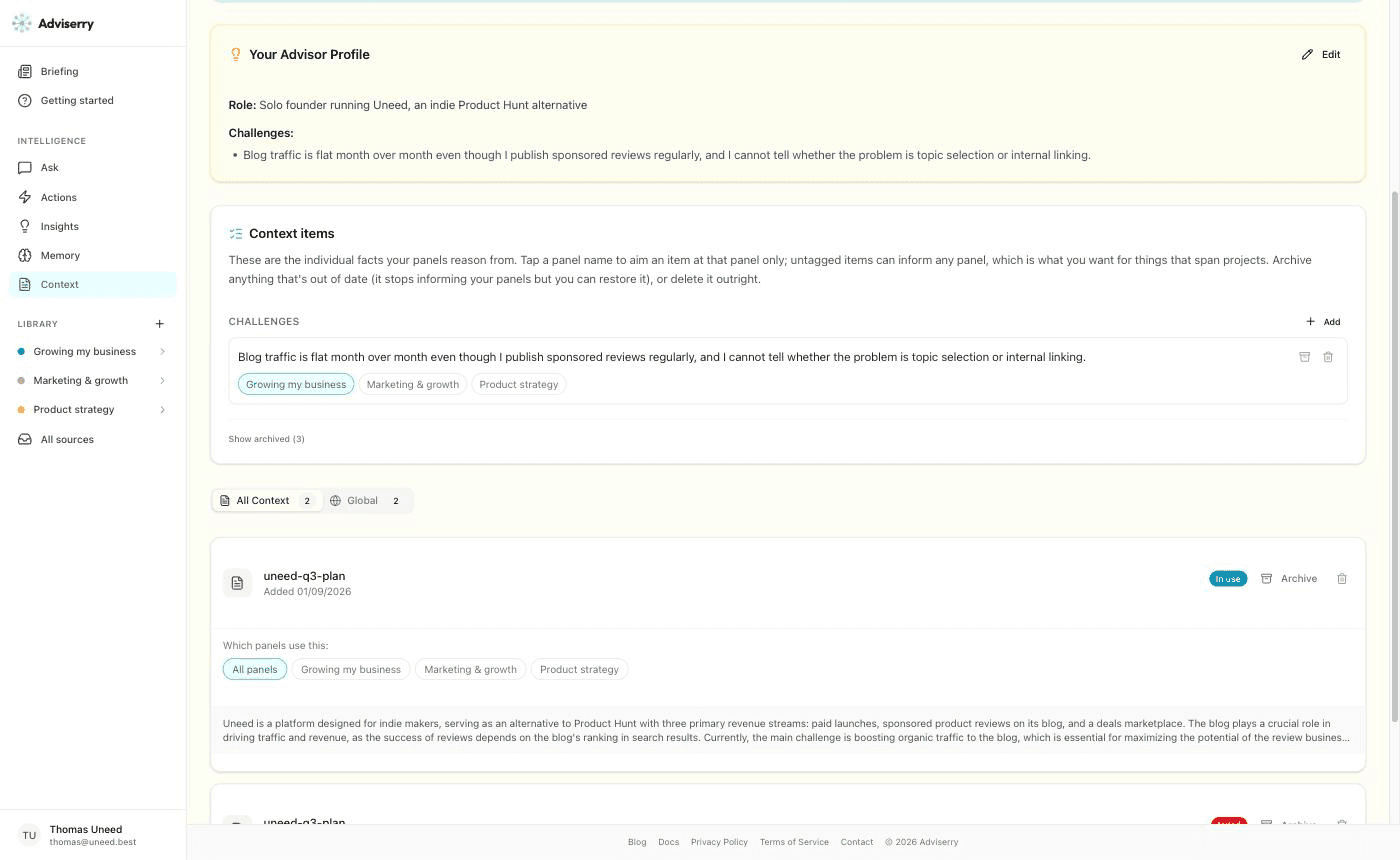
You can also upload documents, and this is where I hit the one real bug of the review. The uploader accepts PDF, Word, PowerPoint, Excel, CSV, TXT, MD, RTF, images and XML up to 10MB each. I generated a five-section internal planning document about Uneed's quarter, saved it as a PDF, and uploaded it. It came back with a red "failed" badge, no error message and no retry. I then uploaded the exact same text as a Markdown file, and it worked perfectly: processed in under a minute, marked "In use", and summarised in one accurate paragraph right there on the card. So the pipeline is fine and something in the PDF path is not. That matters because PDFs are the first format listed and "upload your pitch deck" is one of the pitches. I have passed it to the founder.
The payoff for all this arrives on the Actions page, and it is the most impressive thing in the product. These are not summaries. Each action is a finished draft you could ship in an afternoon, tagged with a domain and an effort estimate ("Quick Win", "~1 Hour"), opening with a "Why now" that quotes my own words back at me, and closing with a "Based on" line naming the source issue.
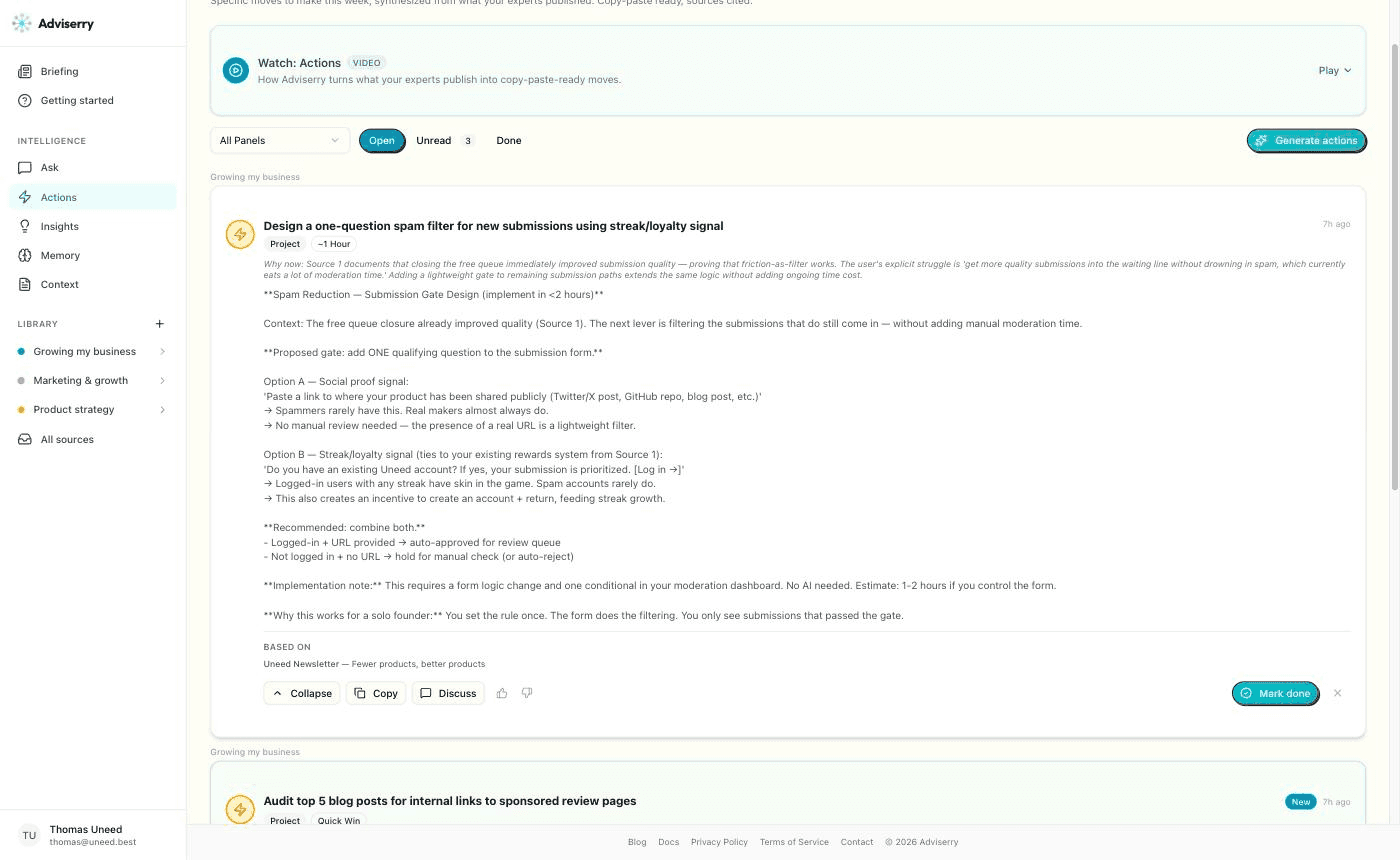
To give you the texture: one action proposed adding a single qualifying question to the Uneed submission form, offered two concrete options (paste a public link to your product, or log in so your streak counts), recommended combining them, estimated the work at one to two hours, and explained why the shape suits a solo founder: you set the rule once and the form does the filtering. Another wrote the actual landing page copy for the $5 skip-the-line codes, headline included. A third was a 30-minute internal linking checklist with the Search Console steps spelled out. These are real, and they are aimed at my situation rather than at founders in general.
Two honest caveats. All four of my day-one actions were drawn from the same source, the Uneed newsletter, because it was the source with the most issues in the archive. The system had essentially read my own writing back to me, sharply, but from my own head. Adviserry is bounded by what you feed it, and a thin archive produces a narrow advisor. Second, the drafts render their Markdown asterisks raw in the interface, so a heading shows up wrapped in stars. Cosmetic, but it is on the flagship screen.
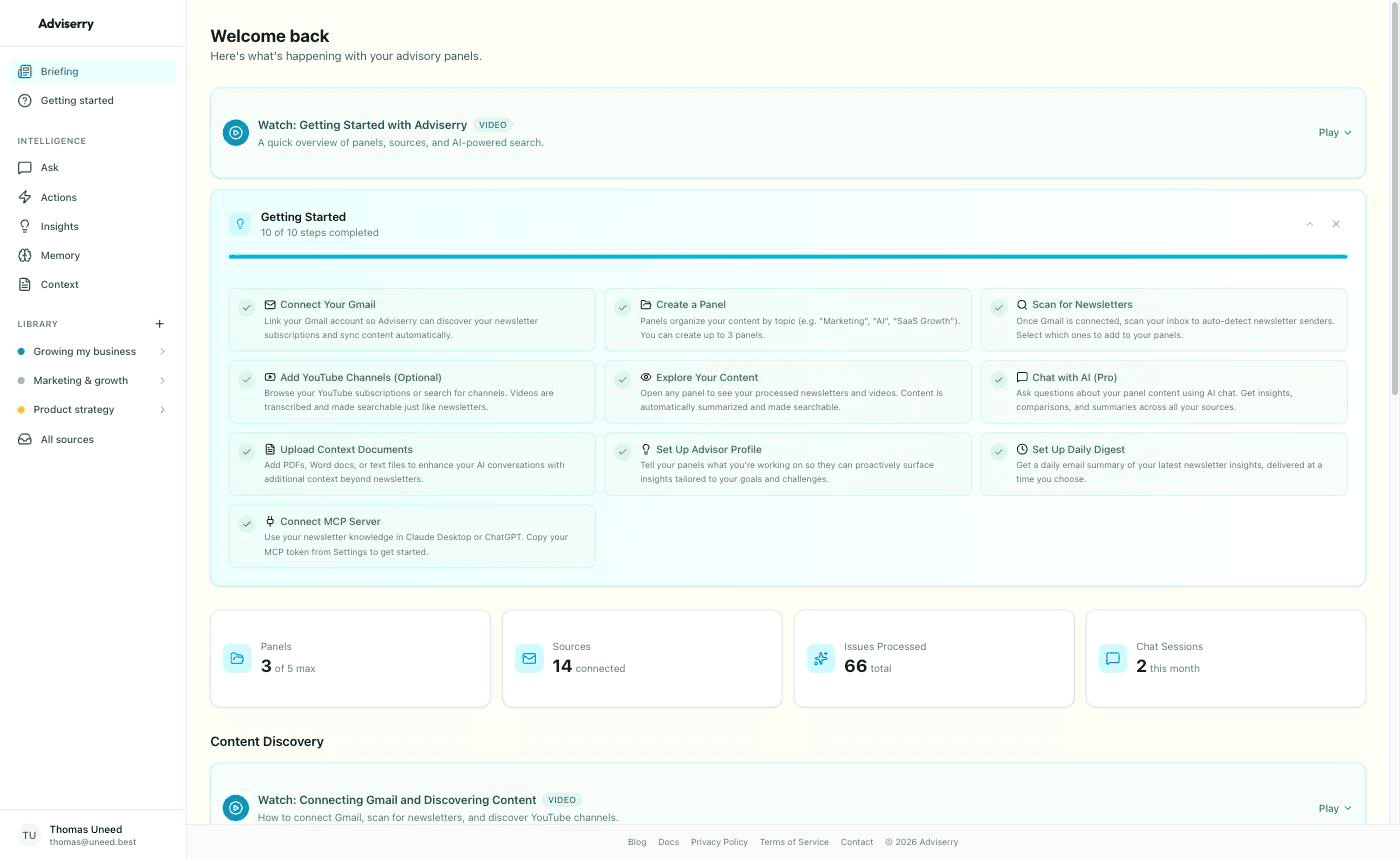
Panels are how you keep one problem's advisors separate from another's. You group sources by theme, and when you have a specific question you ask the panel that covers it. Pro gives you 5 panels of 10 sources; Team raises that to 10 panels.
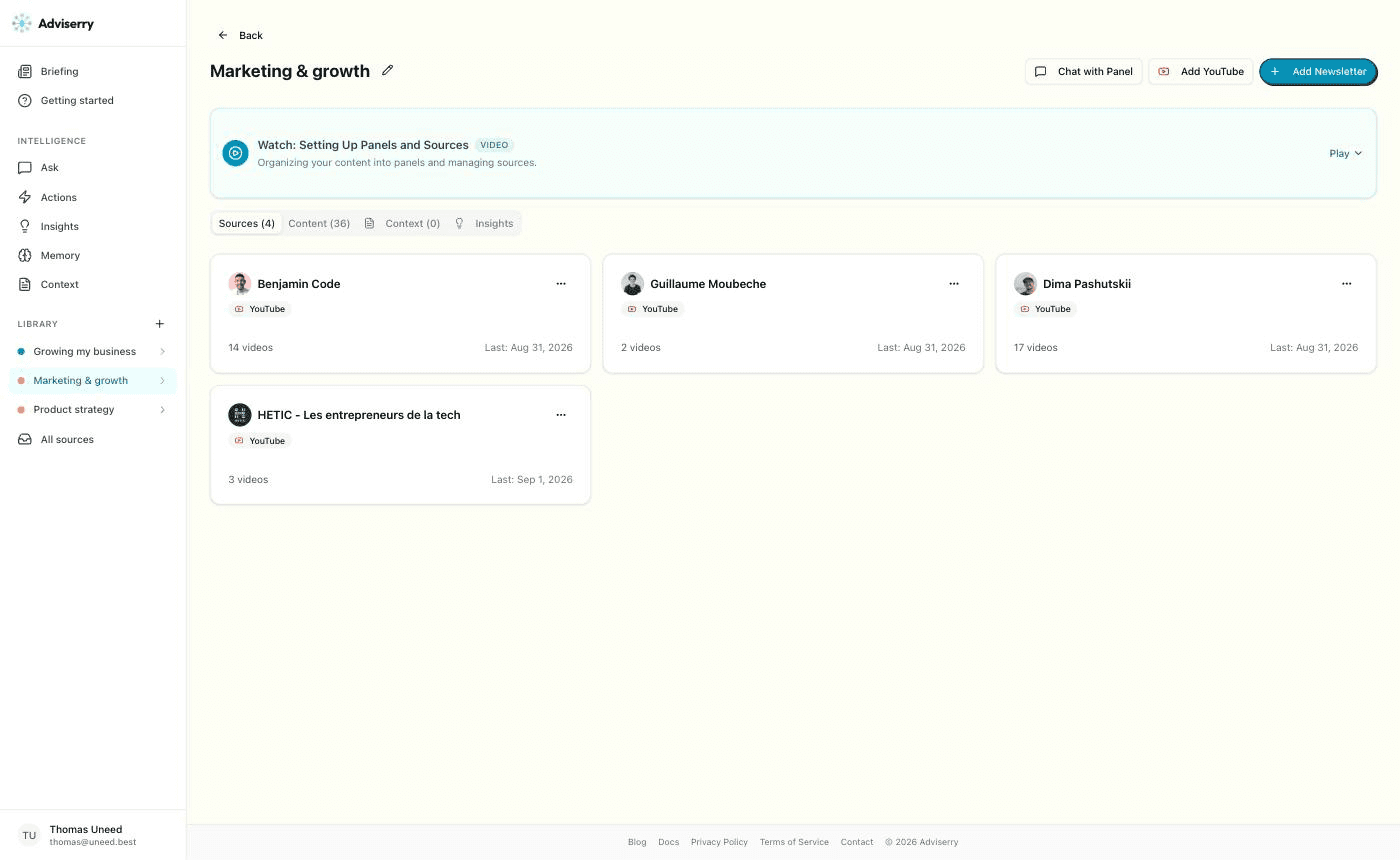
My "Marketing & growth" panel ended up holding four YouTube channels. Adviserry pulls the 50 most recent long-form videos per channel on the initial import, with up to 1,000 historical videos available from the source menu afterwards. In practice the initial import was more partial than that suggests: my four channels contributed 36 videos between them, and the one with a 414-video back catalogue brought in 14.
Asking that panel a question produced the single best answer I got out of the product. I asked what these creators had actually said about launching and getting first users, and wanted tactics rather than theory. It came back with a synthesis of four separate Benjamin Code videos: leveraging his YouTube audience and LLM mentions instead of traditional marketing, the redesign that took two and a half months and dropped his sales from three or four a week to zero, and the argument for incremental change over an overhaul. Those videos are in French. The answer was in English. Cross-language synthesis across a creator's back catalogue, with every video cited underneath as a clickable chip, is a real capability and it is exactly what the product promises.
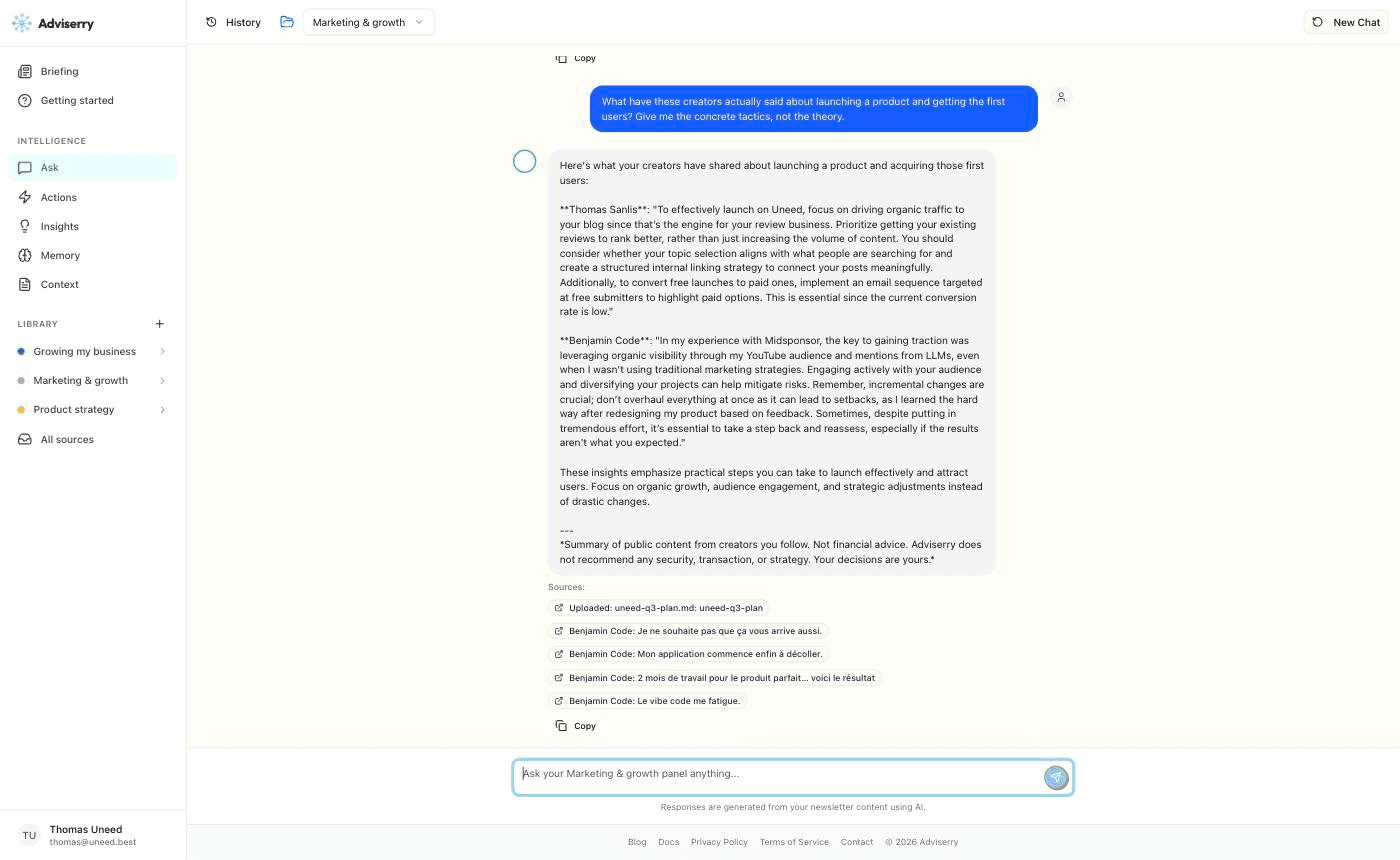
That same answer also contains the flaw I would most want fixed. It opened with a paragraph presented as a quotation from "Thomas Sanlis", styled exactly like the Benjamin Code quote beneath it. That text was not from any expert. It was a paraphrase of the planning document I had uploaded an hour earlier, which is listed first in the sources. Presenting a user's own context back to them as an expert quotation is the one thing a tool built on citation really cannot do, and it undercuts the trust the rest of the citation work earns.
Answers are also uneven across panels. The same question aimed at a panel of ten business newsletters produced something much closer to generic advice, and cited a back-to-school promo email and a survey reminder among its sources. Ask a well-chosen panel a question its sources genuinely cover and it is sharp. Ask a thin or loosely assembled panel and you get the average of what happened to be in the inbox.
The founder's headline claim for panels is deliberate cross-pollination: the weekly synthesis works across panels so that a point from one domain lands on a problem in another. I could not exercise it. On a day-one account with one populated panel, everything came from that panel. It is a claim I am reporting rather than confirming.
Every account gets a personal MCP endpoint, which is what turns the archive from a website you visit into something your existing assistant can query. Settings hands you a token and a ready-made config for six clients: Claude Desktop, Claude Code, Cursor, Gemini CLI, OpenClaw and ChatGPT.
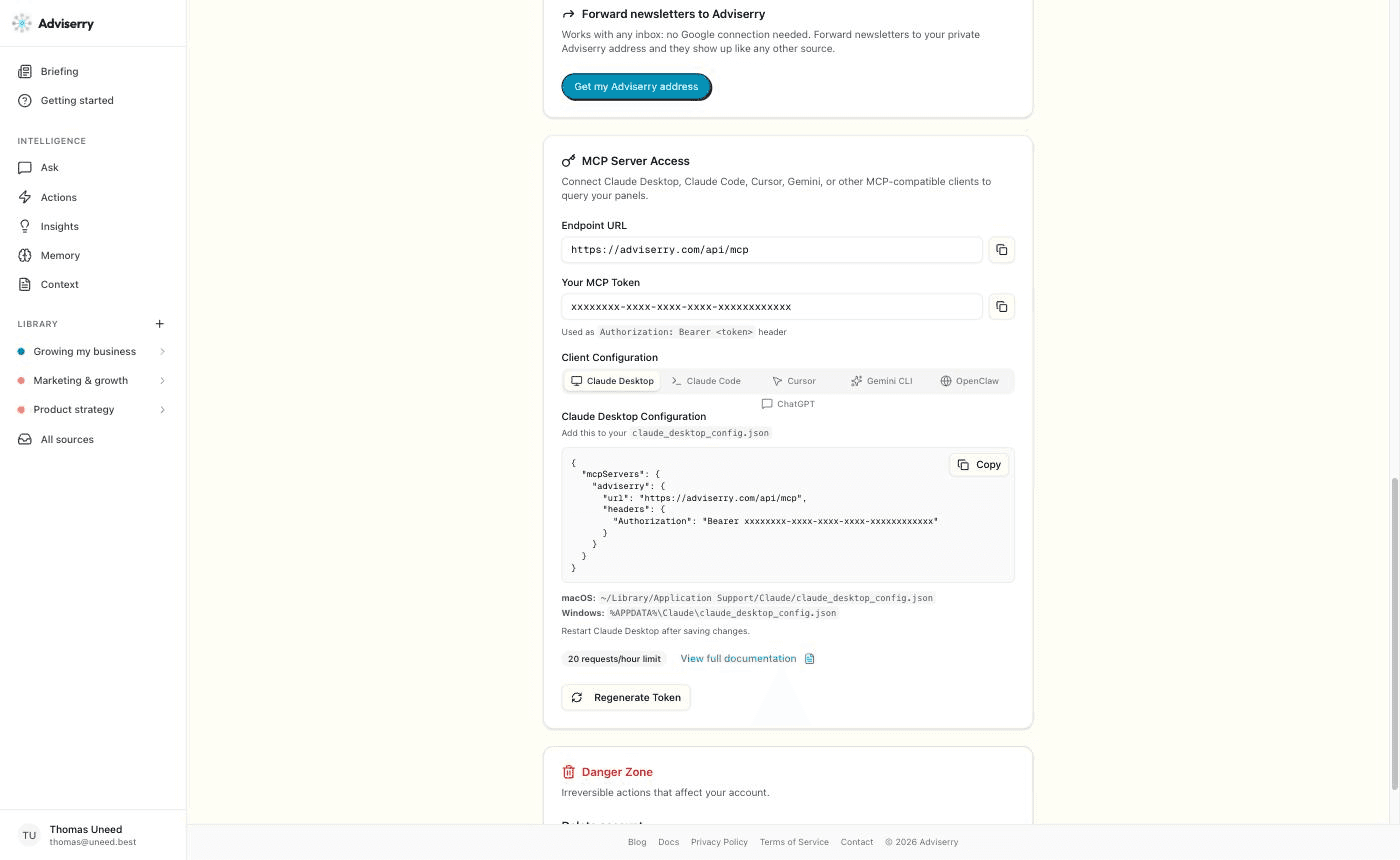
I connected to it directly and worked through the tools rather than trusting the docs. There are 13 of them, and the set is better thought out than most MCP servers I have poked at. list_panels and get_recent_issues for orientation, search_newsletters and search_context for retrieval, get_actions, search_actions and get_action for the drafted moves, and update_action_status so telling Claude you shipped something is reflected on the dashboard and feeds the next synthesis.
The two worth calling out are get_user_context and update_context. I appended a new challenge to my profile from outside the app ("blog traffic is flat month over month and I cannot tell whether the problem is topic selection or internal linking"), and it landed correctly: appended rather than overwritten, tagged to the one panel I specified, confirmed in the response, and visible on the Context page seconds later with the right panel chip lit. The tool is also careful in a way I did not expect. It defaults to append, and any update that would remove existing context returns a preview and a confirmation token instead of saving, so an assistant cannot quietly delete your profile. That is thoughtful design for a write tool.
Retrieval through MCP works but the excerpting is thin. Searching my uploaded plan for the constraint on the review business returned the right document and then handed back three section headings with gaps between them rather than the prose that answered the question. Searching newsletters was better, returning proper summaries with issue IDs and publication dates and an explicit instruction to cite the creator, title and date, though relevance was mixed: one of three results on a pricing question was genuinely about pricing.
One thing I could not settle: the rate limit is documented three different ways. The founder told me 500 requests per hour, the usage meter on the billing page shows a limit of 500, and both the badge in Settings and the public documentation say 20 per hour. I never hit a limit in normal use, but if you are planning to lean on this from an agent loop, ask before you build.
This question deserves its own answer, because it is what most people are searching for and it is not quite what this is.
An AI business coach generates advice from a model's own training, asks you reflective questions, and holds a conversation. Adviserry does close to the opposite. It reads what real, named people you already chose to follow have actually published, weighs it against your situation, and drafts moves with every suggestion traced back to the issue or video it came from. The expertise is sourced rather than generated. When it told me to add a submission gate, the reasoning came from a specific piece of writing about closing a queue, and it said so.
That difference cuts both ways. If what you want is a business advisor AI that will talk you through a decision at midnight, this is the wrong shape and a general assistant is better. If what you want is for the expertise you were already going to consume to arrive as work instead of as a reading pile, this is a different and, to me, more useful thing. It is also not a replacement for a human coach or consultant, and the founder is careful not to claim otherwise. A coach knows your situation from conversation and holds you accountable. Adviserry surfaces expert thinking and proposes moves. You decide what ships.
A quick pass at everything else worth knowing:
Two smaller things I ran into. I picked four topics during setup and only three panels were created, with the fourth silently missing. And list_panels over MCP reported "0 issues" for every YouTube source in a panel the dashboard correctly showed as holding 36 videos, so do not trust that particular counter.
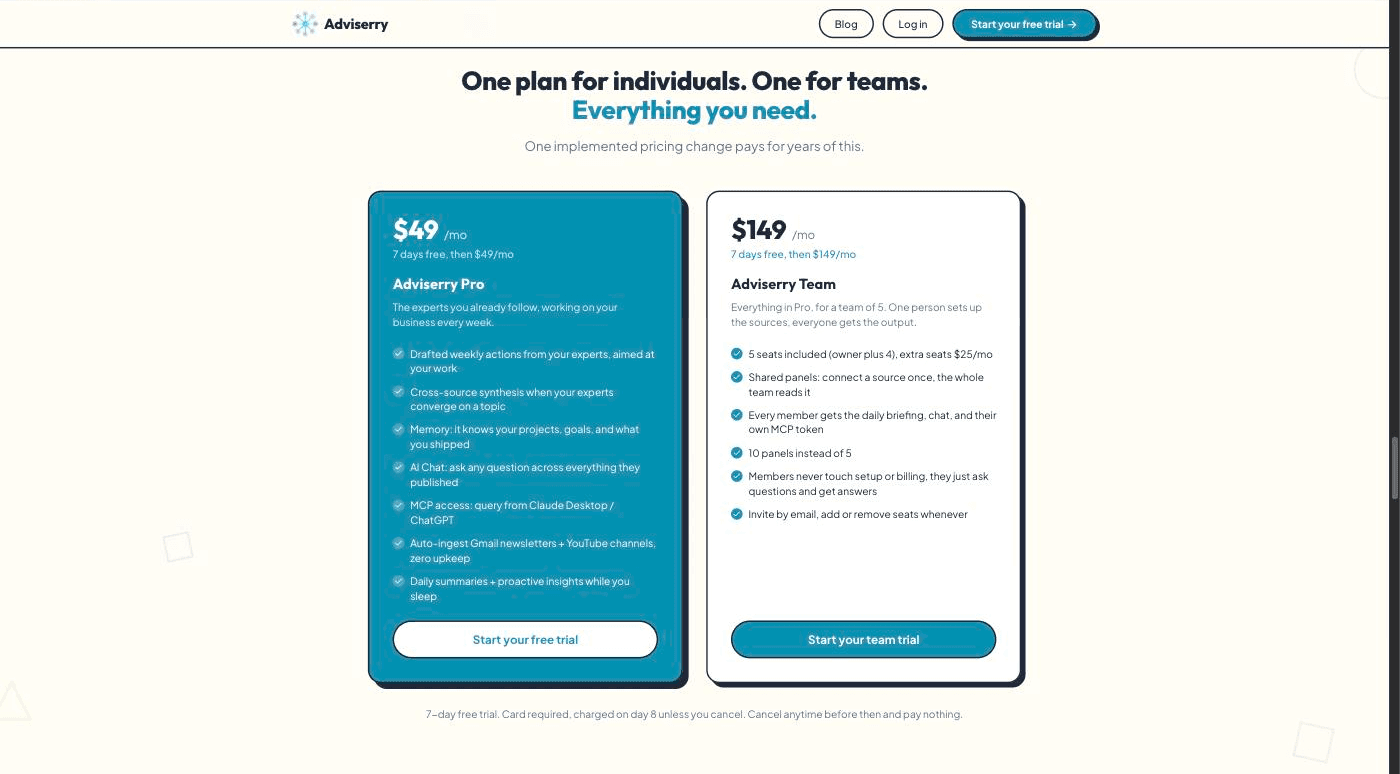
Adviserry runs on one plan for individuals and one for teams, both with a 7-day free trial. The trial requires a card and bills on day 8 unless you cancel, so it is a real trial rather than a free tier.
| Plan | Price | Panels | Seats | Notable |
|---|---|---|---|---|
| Adviserry Pro | $49/mo | 5 panels, 10 sources each | 1 | Weekly drafted actions, AI chat, MCP access, daily digest, memory |
| Adviserry Team | $149/mo | 10 panels | 5 included, extra seats $25/mo | One shared archive, per-member chat and MCP token |
There are usage ceilings behind the plan that the billing page shows you honestly: a daily AI token allowance of 100,000 that resets at midnight UTC, and the hourly MCP request meter mentioned above. A full afternoon of heavy testing, including a document upload, several chat sessions and a synthesis run, used about 5% of a day's tokens.
Is Adviserry an AI business coach? Not in the usual sense. A coach generates advice from the model and asks you reflective questions. Adviserry reads what the specific experts you follow have published, weighs it against your stated projects, and drafts moves with each one cited back to its source. The expertise is sourced, not generated.
Can it replace a business coach or consultant? No, and it does not try to. A coach holds you accountable and knows your situation from conversation. Adviserry covers a different gap: the expertise you were already going to get from newsletters and videos, except read, synthesised against your context, and turned into weekly actions instead of a backlog.
Is this personal knowledge management software? It is closer to a knowledge base that fills itself and pushes back. Tools like Obsidian or Notion wait for you to capture, tag and revisit. Adviserry ingests every newsletter and video from your chosen sources automatically and then proposes actions from what it read. You never file anything.
What sources does it support? Email newsletters through Gmail, an email forwarding address for any other inbox, and YouTube channels, all landing in one searchable archive. You can also upload your own documents up to 10MB each. Podcasts are on the roadmap and not shipped.
Do I have to connect my Gmail? No. Gmail is the simplest path and uses a read-only scope, but the forwarding address lets you use Adviserry from any inbox with a bit more setup.
How many sources can I have? Pro includes 5 panels with up to 10 sources each, so 50 sources. Team raises that to 10 panels.
How long before it is useful? Same day. The scan and historical import populate the archive in minutes rather than after a week of waiting, and you can generate your first actions during setup. The automatic weekday batch lands the following morning.
How does the MCP server work? Every account gets a personal MCP endpoint. You paste a token from Settings into Claude Desktop, Claude Code, Cursor, Gemini CLI, OpenClaw or ChatGPT, and your archive becomes something the model can search directly, including a tool for updating your context without leaving your editor.
If you are shopping around, the honest structural difference is about who does the collecting. NotebookLM answers questions well but about sources you upload by hand, and it does not carry your projects between notebooks. Readwise Reader will pull your newsletters in automatically and then hand you a reading queue. Feedly AI, Mem and Notion AI each solve a piece of this. What none of them do is the last step: deciding, against a description of your own work, which moves are worth making this week and drafting them. That is the whole bet Adviserry is making, and it is a defensible one.
It is a strong fit if you are:
It is not for you if your sources are thin, or if you are unwilling to write a few honest paragraphs about your situation. Both of those are load-bearing. With a vague profile and a handful of random subscriptions, Adviserry will produce competent generic advice, which is the one thing it is otherwise very good at avoiding. It is also the wrong tool if you want a conversation partner rather than an output queue.
That is the end of this Adviserry review. What impressed me is that it commits to the hard half of the problem. Plenty of tools will collect your newsletters. This one reads them against a description of your quarter and hands you a landing page you can paste, an email sequence you can send, and a checklist you can work through in thirty minutes, each with the source it came from printed underneath. When the archive was well chosen, that output was specific enough to act on the same day.
It is also clearly young. A PDF failed silently, a panel went missing during setup, the rate limit is documented three ways, and one answer dressed up my own notes as an expert quotation. None of those are structural, and the founder had already fixed an account problem for me within a day, but you are buying an early product.
What I liked:
Things to keep in mind:
If your reading list has quietly become a guilt pile, Adviserry is the most convincing attempt I have seen at turning it back into work.
Reviewed product
Adviserry brings you the next move from every expert you follow, automatically
Category
BusinessPricing
Paid2extract Review - Residential Proxies Your Agent Can Drive
We've tested 2extract, a developer-first residential and mobile proxy network with an MCP server that lets an AI agent create and manage proxies for you.
SlidesPilot Review - From PDF to a PowerPoint You Can Actually Edit
We've tested SlidesPilot, an AI presentation agent that turns PDFs, Word files, URLs and pasted text into PowerPoint decks that stay grounded in the source document.