Logo of KlipKap Pro

KlipKap Pro

Screen recording that edits itself: auto-zoom, smooth cursor, AI subtitles.

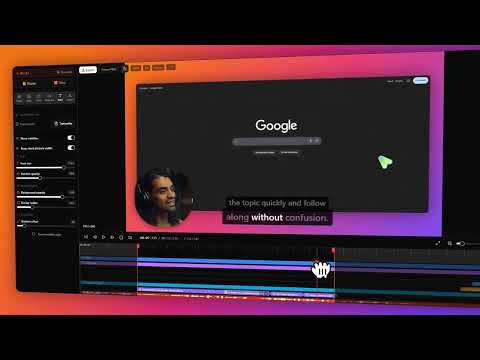
KlipKap Pro is a screen recorder and video editor for Windows and macOS that edits your footage automatically as you record. Select your screen, a window, or a custom region, then capture your screen, webcam, and every audio source, microphone and system audio, all at once, perfectly synced from the first frame.

The moment you stop recording, KlipKap Pro applies cinematic effects on its own: automatic zoom, cursor smoothing that turns shaky mouse paths into a fluid glide, animated webcam picture in picture, and AI generated subtitles, all processed locally with no cloud upload required.

Built in AI audio cleanup removes background noise, keyboard clatter, and room echo for studio quality voice, without plugins. A non linear timeline editor lets you fine tune cuts, zoom keyframes, subtitles, and webcam positioning before exporting straight to the exact format and aspect ratio you need for YouTube, TikTok, LinkedIn, or Shorts.

Built for

  • Developers and SaaS teams replacing spec docs and Slack threads with quick bug reports and PR walkthroughs

  • Content creators turning raw screen recordings into upload ready tutorials in one session

  • Marketers producing in house product walkthroughs and feature announcements without an agency

  • Educators and trainers building chapter ready courses with accurate subtitles and clean audio

What you get

  • Auto zoom and cursor smoothing on every recording, applied automatically, no manual keyframing

  • AI subtitles in 50+ languages, generated offline with no account or usage limits

  • AI audio cleanup that removes noise and echo without extra plugins

  • Six social export presets covering every major aspect ratio and platform

  • 1080p, 2K, and 4K export at up to 120 fps

  • Everything runs on your machine, footage is never uploaded or stored on a server

  • One time payment, no subscription, no renewal, free updates for life

KlipKap Pro replaces the usual setup of one app to record, another to edit, and a third for subtitles, and it skips the monthly bill of cloud based recorders. Record, edit, and export without leaving the app, and keep full ownership of every file you create.


Latest updates from KlipKap Pro

  1. extonsextons Latest

    Wow… I honestly didn’t expect this.

    Seeing #KlipKap Pro reach #1 in the Daily on Uneed really means a lot to me.

    Behind this project, there’s been a lot of time, work, and honestly, quite a few doubts too. You often wonder if what you’re building will actually be useful, if people will like it, and if you’re heading in the right direction.

    So seeing people take the time to discover KlipKap Pro, vote for it, leave feedback, and share it really means a lot.

    I just wanted to say thank you. Thank you to everyone who supported the launch, but also to everyone who took a few minutes to check out the product and share their thoughts. Every bit of feedback helps.

    And beyond the ranking, what makes me happiest is seeing KlipKap Pro being welcomed by a community like Uneed.

    It gives me even more motivation to keep building, listen to your feedback, and make KlipKap Pro better.

    Thank you so much Uneed community. ❤️

    3 0
  2. extonsextons

    Hi everyone,

    I've been lurking on Uneed for a while, reading launches and cheering people on. It feels good to finally post something instead of just reading. Thanks for making this a place where people actually engage, rather than just dropping a link and disappearing.

    I'm Ilyes, a solo developer, and KlipKap Pro just went live. It's a screen recorder for Windows and Mac that automatically edits your recordings the moment you stop recording.

    What pushed me to build this is pretty simple: I was recording a lot of short screen clips for work. Reproducing a bug for a teammate, making a two-minute PR walkthrough, creating a short tutorial for a client…

    And in the end, the recording itself was never what took up my time. It was everything that came after: opening a separate editor, cutting out the dead air, zooming in on the important click, manually syncing subtitles…

    A two-minute video would regularly turn into thirty or forty minutes of post-production, even though the whole point was to save time in the first place.

    At some point, that just stopped making sense to me. And most of the existing tools were way too expensive, with subscription prices that I personally found hard to justify.

    So I spent the last few months building the tool I would have wanted to use myself… and, more importantly, one I would actually have been willing to pay for.

    KlipKap Pro handles the editing automatically:

    • Captures your screen, webcam, and all your audio sources together, perfectly synced from the first frame

    • Automatically zooms in on clicks and smooths out cursor movement as soon as you stop recording

    • Generates subtitles without any manual timing

    • Automatically removes background noise and echo

    • Exports directly in the format you need, with no extra conversion step afterward

    Everything also runs locally: recording, editing, subtitles… all of it happens directly on your machine. Nothing gets uploaded anywhere.

    Building all of this solo has been quite a journey, and I'm really happy to finally share it with you.

    A big thank you to everyone here on Uneed for creating such a welcoming community, for supporting indie makers, and for taking the time to check out new products.

    And of course, thank you to everyone who takes the time to try KlipKap Pro, share feedback, or simply stop by this launch. It genuinely means a lot to me.

    Ilyes.

    6 10

About KlipKap Pro

KlipKap Pro is a design product listed on Uneed, with a free tier and paid plans. It's tagged with Motion & Animation, Video. See the best Motion & Animation products for related options.

Frequently asked questions about KlipKap Pro

What is KlipKap Pro?

KlipKap Pro is screen recording that edits itself: auto-zoom, smooth cursor, AI subtitles.

Is KlipKap Pro free?

KlipKap Pro offers a free tier with paid plans available for additional features.

What are alternatives to KlipKap Pro?

Discover similar motion & animation, video, screen recording products in the Uneed directory.

What category does KlipKap Pro belong to?

KlipKap Pro is listed under Design on Uneed.

What users say about KlipKap Pro

Niyekskhondu13

Absolutely a life changer, I've been using it since release and I'm moving ten times faster with my presentations and recordings, best part is that I don't have to waste time on editing every single click ( I'm a learning trainer in IT ). also the trainees loves it.

a.doryuken-528f

Honestly, as a SaaS owner myself, I’ve been looking for a reliable recording tool to create tutorial videos, and most of the ones I tried just didn’t work the way I expected.Then I found KlipKap.It’s easily one of the simplest and most useful recording tools I’ve used so far. It just works, without making the whole recording process unnecessarily complicated.Definitely recommend it if you’re looking for an easy way to create tutorials and product videos.

Read all 4 reviews